Bid with the estimate you already built
Join TrackOps free as a subcontractor to receive bids and keep your compliance current. Add TrackOps Estimating to price every job in your own company and send that estimate straight to the GC as your bid.
Your estimate, your numbers and your link to each GC stay under your control. The GC gets your bid and nothing else.
Start free, add estimating when you're ready
Every subcontractor on TrackOps gets the free account. Estimating is the paid upgrade that turns it into your own system.
Free
TrackOps for subcontractors
- Bid invitations with a secure link to the package
- Insurance, licenses and tax documents tracked by expiry
- Onboarding forms and agreements signed as eDocs
- Your crews' time and reports on the GC's project
- Invoices submitted and tracked to payment
Paid account
TrackOps Estimating
- Your own TrackOps company under the same login
- The full estimating suite: scopes, takeoff, vendor pricing and the agents
- Send your estimate as your bid, or as the estimate an assignment requires
- Proposals your customers sign, sales orders, jobs and invoices
- Job costing that shows estimate against actual on every job
Bidding with your estimate
Answer a GC with your own estimate
Pick the estimate, check it against the GC's scope items and submit. No retyping line items into someone else's portal, and no second spreadsheet to keep in sync.
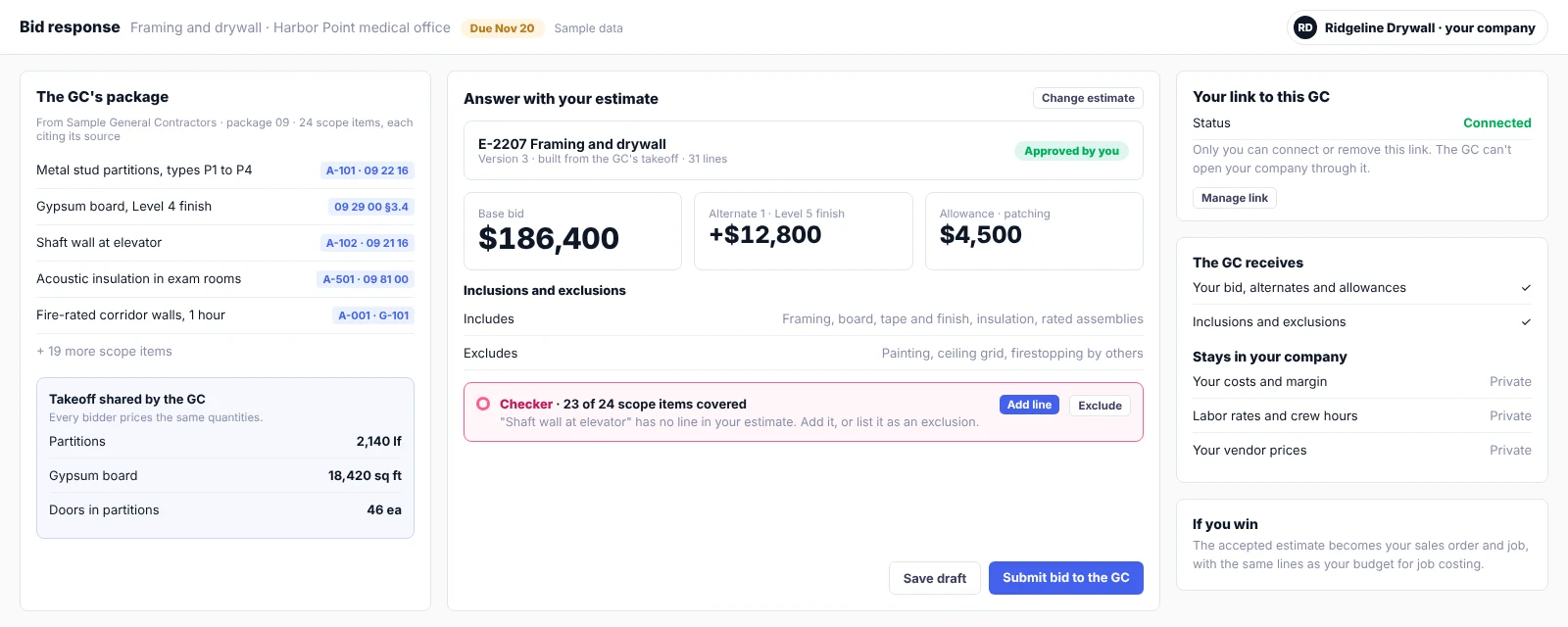
From invitation to job without retyping
Agents draft and check. You decide what goes to the GC.
The GC sends a scoped package
Scope items cite the drawing sheets and spec sections they came from, and the GC can share its takeoff.
You build the estimate in your company
From the GC's quantities or your own takeoff, priced from your book and your vendors.
The checker compares it to the scope
Any scope item without a line in your estimate is flagged, so you add it or exclude it on purpose.
You approve and submit
Your estimate goes to the GC as your bid, with nothing retyped into a portal.
Win it and the job is already set up
The accepted estimate becomes your sales order and job, with its lines as the budget for job costing.
You control the link to every GC
Working with a GC on TrackOps should never mean opening your books to them.
You make the link
Only you can connect your company to a GC's subcontractor record, and only you can remove it.
The GC can't look in
The link lets you send estimates to the GC. It never lets the GC open your company.
The GC receives your bid
Base bid, alternates, allowances, inclusions and exclusions: what any bid would carry.
Your numbers stay yours
Costs, margin, labor rates, crew hours and vendor prices stay private to your company.
Questions subs ask
Is TrackOps free for subcontractors?
Yes. Joining TrackOps as a subcontractor is free: receive invitations, bid through the link, keep your compliance documents current and invoice the GC. Estimating in your own company is a paid TrackOps Estimating account.
Can the GC see my costs?
No. The GC receives your bid. Your costs, margin, labor rates and vendor prices stay in your company.
Which GCs can receive my estimate as a bid?
Any GC on TrackOps that also runs TrackOps Estimating. For other GCs on TrackOps, you bid through the free invitation link as usual.
Do I need another login?
No. Your own company sits under the same login, and you switch between companies without mixing any company's data.
Can I use estimating for work outside GC bids?
Yes. It is the full suite, so you can quote homeowners, property managers and any other customer, with proposals they sign and jobs you run in TrackOps.
Price your next bid in TrackOps
Tell us your trade and how you estimate today. We'll show you TrackOps Estimating on a bid like yours and answer your questions about pricing.